
Writing

100 days. 100 projects. One LLM prompt at a time.

Each post here is a project built with AI assistance — browser extensions, bots, tools, dashboards, analyzers. Some took an afternoon. Some fought back. All of them taught me something about what these tools are actually good at, and where they fall short.

The rule: build something real, ship it, write about it honestly.

Reading The Wealth of Nations with a Paragraph-Level AI Tutor

·3 mins
Wealth of Nations Reader

Building a Personal AI Reader for The Wealth of Nations #

Project #12 of the 100 Vibe Coding Projects challenge


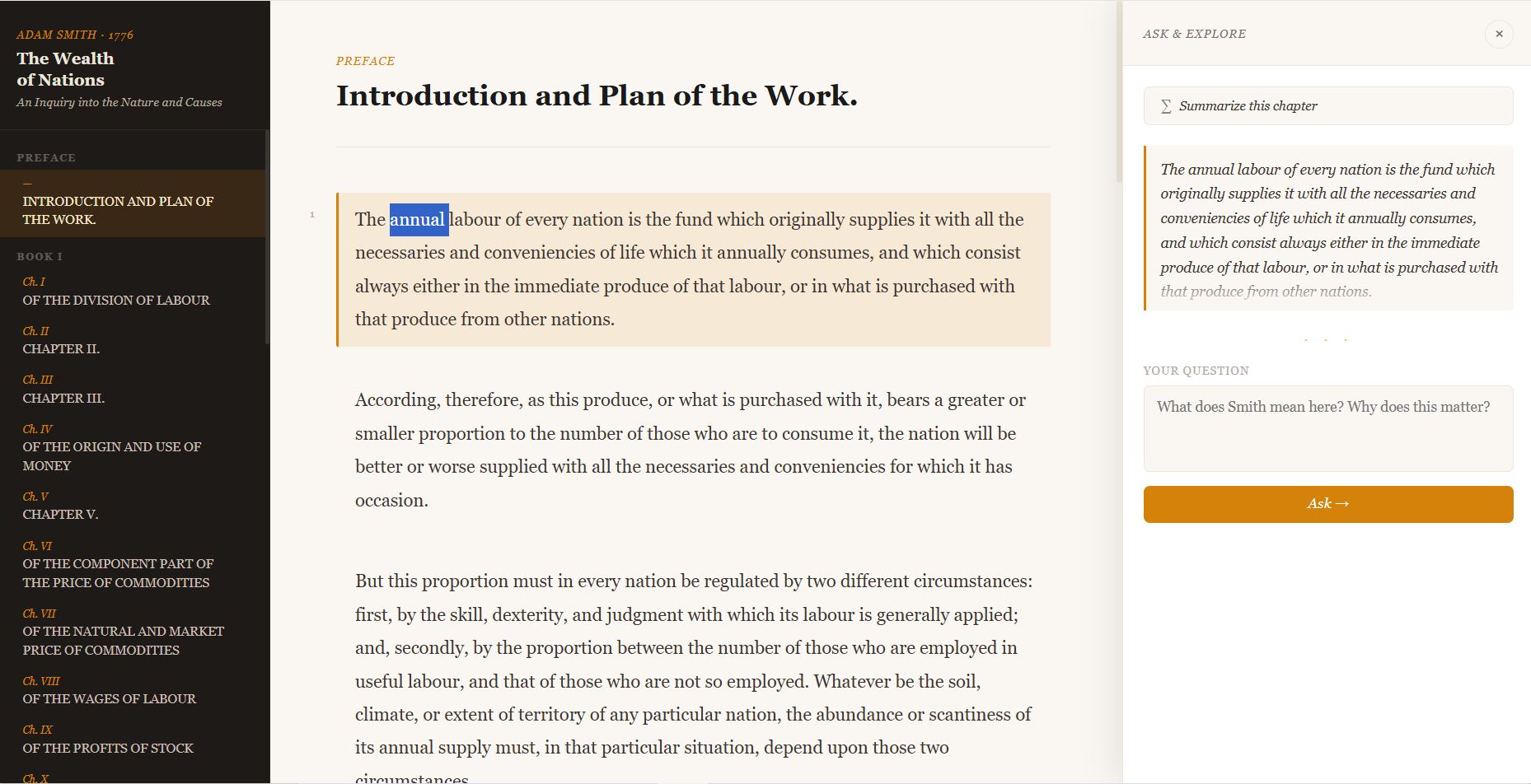
I’ve been meaning to read Adam Smith’s The Wealth of Nations for years. It sits in the cultural background of every economics conversation — the invisible hand, the division of labour, the theory of wages — but the full 900-page text is dense and I kept bouncing off it.

Vibecoding 011: Everything is Everything — What 128 Episodes of Amit Varma's Podcast Recommend

·6 mins

Everything is Everything Podcast

I’ve been listening to Everything is Everything — Amit Varma and Ajay Shah’s podcast — for a while now. Every episode is dense. Books, papers, essays, songs — recommendations come fast, buried in show notes that you’d have to open episode by episode to find. I kept thinking: somebody should just compile all of this.

So I did.

This post explains how I built three reference spreadsheets — one each for books, music, and articles — covering all 128 episodes of the podcast. Everything is on GitHub if you want to poke around or build on it.

The APK Analyzer That Runs on Your Machine and Tells No One

·8 mins

image

Building an Offline APK Security Analyzer in Flask #

Project #10 of the 100 Vibe Coding Projects challenge


I’ve been doing APK security analysis manually for years — pulling the file, running jadx, grepping through decompiled source, eyeballing the manifest. It works, but it’s slow and the output lives in a terminal window that disappears the moment you close it.

KaggaBot: Automating Daily Verse Posts With GitHub Actions

·3 mins

image

What’s Mankuthimmana Kagga #

Mankuthimmana Kagga — often called the Kannada Gita — is a collection of 945 philosophical verses by D.V. Gundappa (DVG). Written in the 1940s, it wrestles with life’s biggest questions with a rare combination of humility and depth. It deserves a wider audience.

KaggaBot #

It’s a small automation that does one simple thing: post two verses from the Kagga every day to Mastodon (an ad-free social media platform), automatically, without anyone pressing a button.

I Asked AI to Help Me Build a Home Radio Server on a Sunday Afternoon

·4 mins

image

I Asked an AI to Help Me Build a Home Radio Server. Here’s What Actually Happened. #

I have a few hundred MP3s sitting in a folder on my laptop — old Kannada film songs, some Tamil classics, a few English albums I ripped years ago. I wanted to stream them to my phone, maybe share the stream with family. Simple enough idea.

Putting 945 Verses of Kannada Philosophy on the Internet, One at a Time

·3 mins

image

Building a Bot to post Mankutimmana Kagga verses to Mastodon #

D.V. Gundappa’s Mankutimmana Kagga — 945 verses of timeless Kannada philosophy — deserves a wider audience. So I built a Mastodon bot to post one verse at a time, twice a day, complete with transliteration and English explanation. Here’s how it came together.

The Prompt #

The project started with a simple ask to Claude: “Create a Mastodon bot to post Kannada Mankutimmana Kagga verses with a short explanation, configurable on how often to post.” From that single sentence, Claude scaffolded a complete Python project — kagga_bot.py, config.py, kagga_verses.py, and a scraper to pull all 945 verses from a public repository.

One Page, Five Sources, Zero Noise — My Security News Dashboard

·4 mins

image


I wanted a single place to read cybersecurity news from the sources I already trust — SANS ISC, Bruce Schneier’s blog, Brian Krebs, Bleeping Computer, and Zack Whittaker’s This Week in Security. I wanted something purpose-built for security, with AI-generated summaries short enough to scan quickly.

The result is SlashSec: a single HTML file, no build step, no server, no dependencies beyond a free Groq API key.

Making a 30-Year-Old Codebase Approachable With AI

·3 mins

image

Curl Source Explorer: Learn a 30-Year-Old Codebase Without Getting Lost #

Curl has been running on virtually every computer on the planet since 1998. It’s one of the most-used pieces of software ever written — and almost nobody who uses it daily has ever read a line of its source code.

That’s partly because diving into a mature C codebase is intimidating. There are no onboarding docs for the internals, no guided tour, no one to ask why a particular function was written the way it was. You’re either grepping through 170,000 lines alone, or you’re not reading it at all.

Building My Own Interview Coach for a Director-Level Security Role

·4 mins

image

Prompt Used: #

Build an interview simulator, for an upcoming job interview for a senior cybersecurity role. Generate flashcards which will give me appropriate vocabulary for risk, governance, leader, team building, story-telling in STAR format, context-action-impact frameworks. The web-based app, should help me practice consistently by keep track of my effort in terms of practice time, weak areas, strengths and allow me to add sources for topics, content, role specific job descriptions if available. Example Role: Director SOC

Extracting One Usable Idea From Every Podcast Episode

·4 mins

image

Prompt Used #

-First Iteration: Create a summary of the podcast Think Fast, TalkSmart by Matt Abrahms, I want to extract a specific part of each podcast episode, what is the advice which each podcast episode guest shares, which can be put on a powerpoint slide and is 7 words or less.

-Second Iteration: Add natural, inspiring music. Also add slow fade out and transitions between slides. Where possible add some washed out imagery to make the text more relevant and appropriate.