Vibecoding 020 — JuiceSec: OWASP Vulnerability Lab with AI Tutor
Table of Contents
OWASP Juice Shop is the gold standard for learning web application security — a deliberately vulnerable Node.js app where you practice exploiting real vulnerabilities in a safe environment. I wanted to build something with the same spirit but without the setup: no Docker, no Node, no local install. Open a URL, start hacking.
The result is JuiceSec: ten interactive challenges covering the OWASP Top 10, with an AI tutor that coaches you through each one using the Socratic method.
The challenges #
All ten run entirely in the browser. There’s no real backend to attack, but the simulations are faithful enough to teach the actual mechanics:
| # | Challenge | OWASP 2021 |
|---|---|---|
| 01 | SQL Injection | A03 — Injection |
| 02 | Reflected XSS | A03 — Injection |
| 03 | Broken Authentication | A07 — Auth Failures |
| 04 | IDOR | A01 — Broken Access Control |
| 05 | Security Misconfiguration | A05 — Misconfiguration |
| 06 | Sensitive Data Exposure | A02 — Cryptographic Failures |
| 07 | JWT None Algorithm | A02 — Cryptographic Failures |
| 08 | Command Injection | A03 — Injection |
| 09 | SSRF | A10 — SSRF |
| 10 | Stored XSS | A03 — Injection |
The SQL injection challenge shows the query being constructed in real time as you type: you can watch exactly what happens to the WHERE clause when you inject ' OR '1'='1. The JWT challenge gives you a live token decoder and encoder, so you can swap alg: HS256 for alg: none and escalate your role from user to admin. The SSRF challenge accepts any URL and shows what the server “fetches”. Point it at 169.254.169.254 and watch it hand over AWS IAM credentials.
Each challenge is solved, not explained. You have to find the exploit yourself.
The AI tutor #
The right panel is a chat interface backed by Cloudflare Workers AI (llama-3.1-8b-instruct). It has two modes:
Hint mode — Socratic. It never gives you the answer. Instead it asks questions that push you toward the right mental model: “What do you think happens to the SQL query if your input contains a single quote?” It’s genuinely annoying in the best way.
Explain mode — fires automatically when you solve a challenge. It explains the root cause, gives a real-world example of the vulnerability being exploited, and describes the correct mitigation. This is the part that makes it educational rather than just a game.
The system prompt is strict: the tutor is forbidden from revealing the exploit string until the challenge is solved. I tested this and it holds — even when you ask directly, it redirects to a guiding question.
Architecture #
Same pattern as
argus — a single Cloudflare Worker that serves the full app at GET / and handles the AI tutor at POST /tutor. No external API keys. No database. No build step.
GET  /        → full HTML/CSS/JS app (inlined)
POST /tutor   → Workers AI (llama-3.1-8b-instruct)
The challenge logic runs entirely in browser JavaScript. A simulated ORDER_DB object backs the IDOR challenge. A commentStore array backs the stored XSS comment board. The JWT challenge uses btoa/atob in the browser to encode and decode tokens. None of this is real — but the vulnerability patterns are.
One thing that bit me: all the challenge JavaScript lives inside a template literal (const HTML = \…`) in the worker. JavaScript template literals silently strip backslashes from unrecognised escape sequences, so every regex using \w, \s, \S, \bin the challenge code was broken at runtime./on\w+=/was arriving in the browser as/onw+=/. Fixed by doubling every backslash in the template: \w, \s`, etc. The kind of bug that only shows up when you’re testing the live app.
What it looks like #
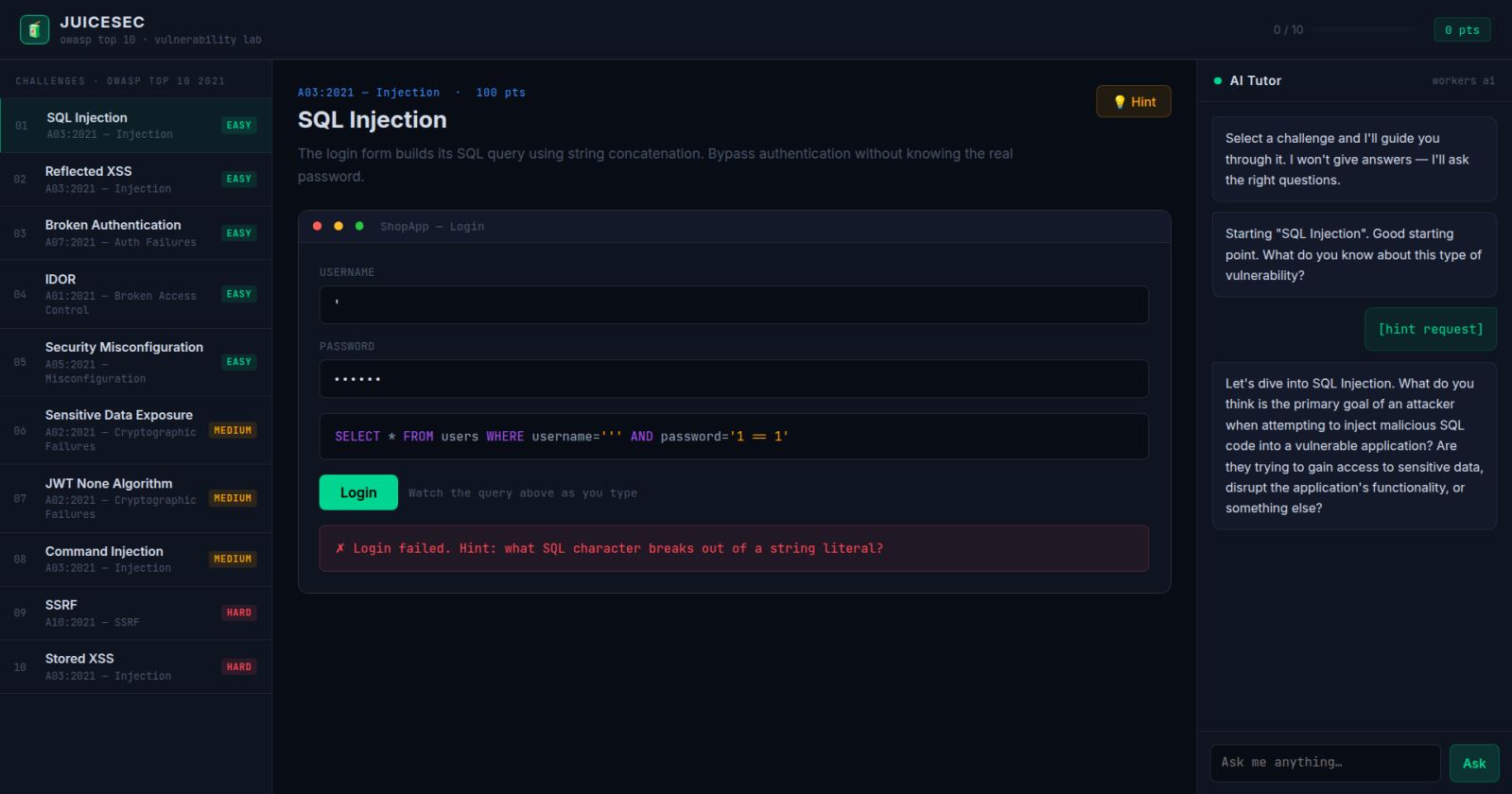
Three-pane layout: challenge list on the left (with OWASP category and difficulty badge), the interactive playground in the centre, and the AI tutor on the right. Dark theme, terminal green accents, JetBrains Mono for code elements. Score and progress tracked in the header.