Vibecoding 030 — A links page that fills itself from my phone
Table of Contents
I find a lot of good things on the web, and I lose most of them. They end up in a WhatsApp chat with myself, or in forty open tabs, or in a “read later” app I never open again.
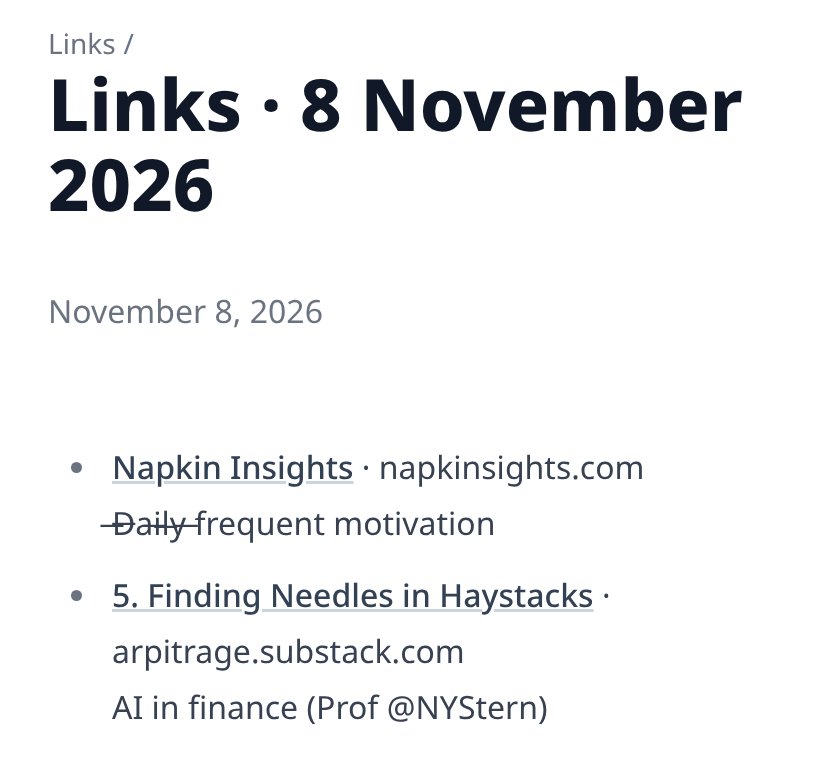
I wanted a public log instead. One page a day, a list of links, and a line on why each one is worth your time.
Live: mrdee.in/links
Where to put it #
I started with a short list: Tumblr, TiddlyWiki, Bear Blog and write.as. Claude suggested a simple test for all of them. A daily habit lives or dies on how fast you can save a link from your phone. If it takes more than a tap and a sentence, I’ll stop doing it by Thursday.
Tumblr is quick to save to, but the links would sit on someone else’s platform, among the ads. TiddlyWiki is a good notebook and an awkward thing to publish from a phone. Bear Blog is clean, with RSS and your own domain, but there’s no share button, so every link means opening the editor. write.as is for essays.
So the links live here, on this blog, which already has a theme, an RSS feed and analytics. The missing piece was getting a link from the phone into the blog’s Git repo.
How it works #
It’s a small web app that I installed on my phone’s home screen. Installing it puts “Links” in Android’s share menu, next to WhatsApp and Gmail.
When I share a page to it, I can type a note, and the link goes into a queue. The app shows the queue, and I can delete anything I change my mind about. At 23:30 every night, a Cloudflare Worker takes the day’s queue and commits it to this blog’s repo as one Markdown file. Cloudflare Pages sees the commit and rebuilds the site.
I could have published each link the moment I shared it. That would have meant a rebuild per link and no chance to take something back. The nightly batch is a better fit for “one page a day” anyway. There’s a Publish now button for when I can’t wait.
What happens to a link #
Shared links come with junk attached. A YouTube link from the share menu has ?si= on the end, which tells YouTube who shared it with whom. Newsletters add utm_source, Facebook adds fbclid. The Worker strips 36 of these.
It leaves ref alone. Some lists of tracking parameters include it, but GitHub uses ?ref= to mean a branch. Strip it and the link goes somewhere else.
If the share didn’t include a title, the Worker fetches the page and reads its <title>. It reads only as far as the end of the page header, and gives up after five seconds.
Then there’s escaping. This blog lets raw HTML through in Markdown, and the titles come from other people’s pages. A page titled <script>…</script> would end up on my site as a script. So every title and note has its <, > and & escaped, along with the Markdown characters that could break a link.
The password #
My URL shortener from an earlier project falls back to the password changeme if I forget to set one. This one refuses everything until a password is set. That’s a one-line difference, and it’s the line that matters if I ever deploy in a hurry.
The Worker commits to GitHub with a token that can do exactly one thing: change files in this blog’s repo. If it leaks, the damage stops there.
The bug that wasn’t in the code #
The first Publish now said: GITHUB_TOKEN secret is not set. I had set it. Wrangler said so, and the secret was right there in the list.
It was set, to nothing. I’d pasted the token at a prompt that hides what you type. In MATE Terminal, Ctrl+V doesn’t paste; Ctrl+Shift+V does. So the prompt got an empty line, and Wrangler saved an empty secret without a word of complaint.
The fix was one extra command before saving: printf '%s' "$T" | wc -c. It prints the token’s length. It said 0. With the token pasted properly, the first two links went up a minute later.
What I took away #
The code took under an hour. Choosing where to publish took a conversation. The one bug was a keyboard shortcut.
A tool you build for a daily habit has to be fast to use, and this one is: share, type a line, done. Whether the habit lasts is up to me.
Source: github.com/mr-dinesh/links-inbox
Part of the 100 Vibe Coding Projects series.